The Cyan Page
Ported from the original Wakfu MMO Rentry.
Current patch: 1.92
Last updated: 8/20/2026
What’s changed: I decided to port the entirety of the Wakfu MMO rentry since the owner of Rentry had some… very questionable stances regarding about the Israeli–Palestinian conflict . Very bad ones, I say. So I mustered up and skimmed over using Hugo since it uses Markdown (the same language Rentry uses) to generate websites. I know that it’s not as pretty looking as the Rentry, but hey, if it works, it works.
Also I’ve been slacking off maintaining this since I had a severe crashout of “Sacrier getting abandoned for the 23489th time” until the proposed changes came along, which I am very satisfied with. Nevertheless, if you want to add something to this page, mail me at thecyanpage@urovorozu.xyz , as I was unaware that there are more resources/websites popped up since the last time I updated this.
Some of the entries were removed since it might not hold up to the current state, especially with class guides. Worst case scenario, I might semi-retire the Class guides section since there was no one willing to write for their main class, so I suggest to throw your questions in the official Discord server.
The important stuff
- Official WAKFU MMO Discord server: https://discord.gg/PCmsGVxvHd
FYI this is not the “official Wakfu animated series” Discord server. Those are two completely different things.
- [French] MethodWakfu / YouTube channel - One-stop-shop for quest information & Wakfu’s own DPLN (Dofus pour les Noobs).
- Chachastuce - Horde tracker, with an installable companion app. there’s also the Discord server since the app can only run on Windows.
- Wakfuli - Currently WIP, but functional to make builds. Made by Ymoka, supposed to be a modernized ZenithWakfu. Also has its own skin maker.
For new/returning players
Note: Starting patch 1.81, they have implemented in-game guides where you can learn more about the basics systems of the game. To access them, press SHIFT + T.
- Hooks’ New and Returning Player Breakdown guide
- Lightus’ guide to sharding, sublimations, etc. - a video explaination of how the rune system, aka enchantments works
- Wakfu Enchantment Pour Les Noobs - a comprehensive guide about enchantments
- Pop’s English beginner guide
- Dame Rika’s 6 tips for beginners
- Shin’s 10 tips for newcomers • Part 1 • Part 2
- Ken Evagreen’s beginner friendly tierlist
- New marketplace, explained
Class guides
Note: If there are no guides in the class you’ve been looking for, it means that there is no one available to dedicate their time writing a guide. Making one takes time, so don’t expect every class has one, as they may be removed anytime when the class went under rework/balancing. I suggest that you inquire or ask questions about them in the official Discord server.
| Class | Content |
|---|---|
| Cra | N/A |
| Ecaflip | In-Depth Guide to Ecaflip — Creating Chaos with a Cheshire Smile • A Complete Algorithm to Getting Universe Card Every Turn |
| Eliotrope | Ibnat’s Reworked Eliotrope guide |
| Eniripsa | Raff’s Eniripsa Healer guide • Danatronne-Shadow’s beginner friendly Eni build |
| Enutrof | N/A |
| Feca | N/A |
| Foggernaut | N/A |
| Huppermage | Huppermage Fundamentals by Daigo/Tigerator |
| Iop | N/A |
| Masqueraider | Owlite’s guide to the Masqueraider |
| Osamodas | All 33 Osamodas summons explained |
| Ouginak | N/A |
| Pandawa | N/A |
| Rogue | N/A |
| Sacrier | N/A |
| Sadida | Kuku’s 1.83 Sadida guide |
| Sram | N/A |
| Xelor | N/A |
Tools
- Wakfu LFG - community-built dungeon party finder for people who still yearns for a functional party finder to be added in the game
- WakfuCalc - a set of tools for theorycrafting, written in Google Sheets
- Craftkfu - crafting calculator
- Koro’s crafting professions leveling calculator - written in Microsoft Excel, might need to open it with Excel Online/Google Sheets
- Value sheet - sheet containing values for player/profession XP & elemental resistances
- Eisaku’s dungeon names in 4 languages - useful when teaming up with FR/ES/PT players
- Suspect & Genn’s damage calculator - written in Google Sheets, make a copy in order to use the sheet
Gear builders
- ZenithWakfu - It works, but most of the UI aren’t fully translated to English.
- WakForge - In maintenance mode, development is inactive indefinitely.
- Gearfu - Gear builder with filters for prioritizing item weight, total mastery, etc.
Themes
Important: For installing themes made before 1.82, read here: https://www.wakfu.com/en/forum/332-development/241635-installing-creating-custom-ui-themes
You can find themes at the Development subsection @ Wakfu forums: French / English .
Leveling
- Leveling locations by level (last updated 2022)
- Guild of Hunters camp locations (last updated 2023) - Forum post
Sublimations
Dungeons
Misc.
Disregard 0:27 to 1:07, as obtaining the laugh emote requires you to kill 2 arch mobs at Rii
- Kuro’s Relic Aura List
- Grand list of Sublimation Clarifications, Fringe Cases, and Level stacking (last updated 2022)
- Rift artifacts cheatsheet - Forum post
- Artifact treasure chests locations (last updated 2023)
Trobuleshooting
Client lagging/high GPU memory usage when streaming the game on Discord
This is an issue of Discord’s “advanced” technology to capture the frames of the game, in which given how ancient the code of the game is, it tends to start leaking GPU memory (in other words, sudden spike on VRAM usage and eventually overwhelming your system’s RAM) and things will start to be laggy within seconds.
There are two things to remedy this situation: use the web browser version of Discord, or disable the advanced tech in the settings. Obviously, the latter is going to be the much preferred option, otherwise go with the web browser route for other reasons (e.g. distrustful of Discord’s antics, or running thin on system resources).
In User Settings under App Settings, select Voice & Video. Scroll down until you see Screen Share under Advanced, then disable that advanced technology.
Recording/streaming the game in OBS
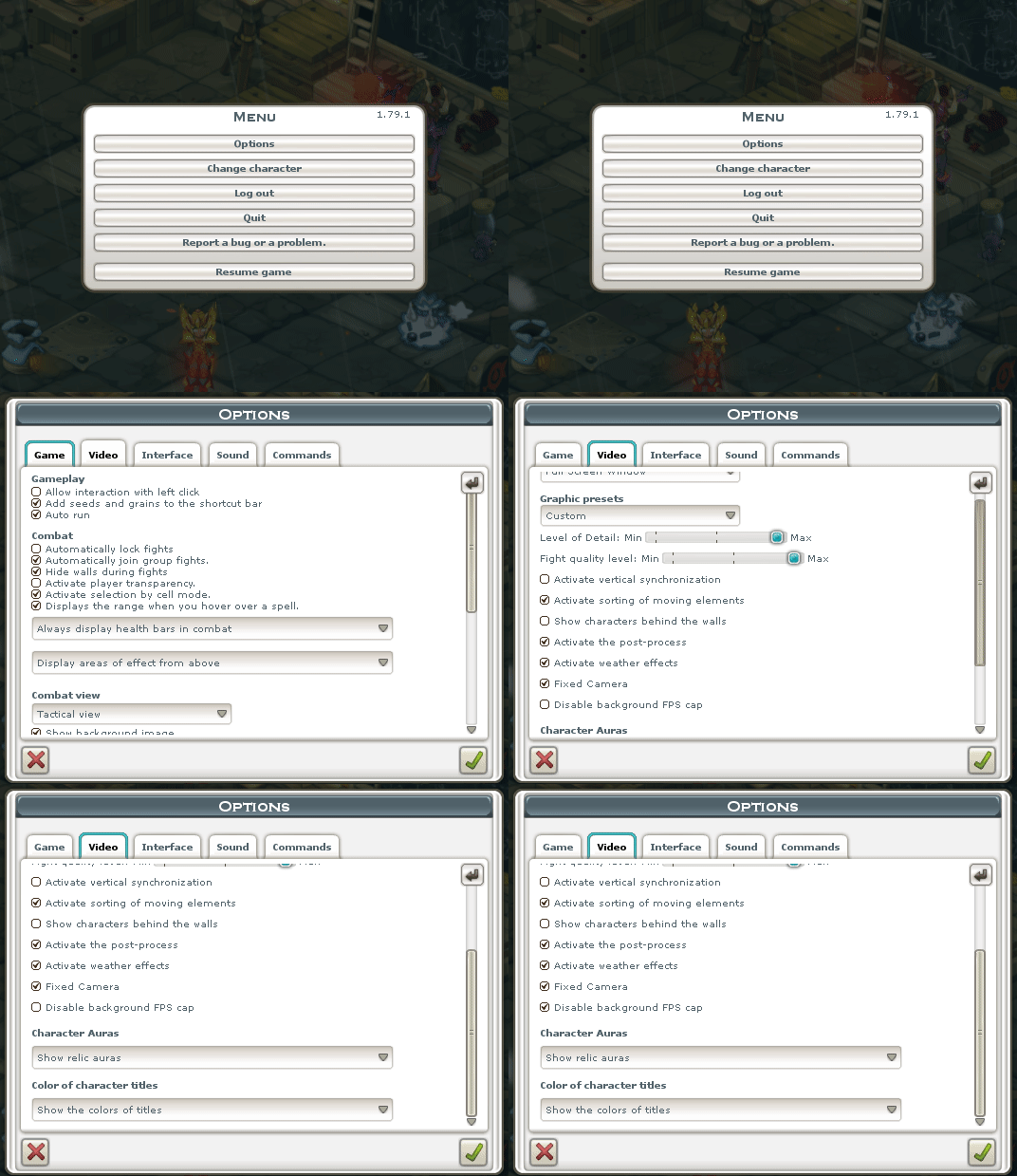
If you’re planning to record or stream in OBS, do not use Game capture. OBS can’t reliably capture the gameplay footage as it interferes on the graphics code of the game, instead, use Window capture and over in the Video settings in-game, switch to “Full screen window” and tick “Disable background FPS cap”.
Game softlocks to black screen while in-game
This is due to the client’s limited memory allocation. Refer to this blog post for the fix.